On this page
Who should use Movidesk Asset Management
What you can do with Movidesk Asset Management
Enabling Asset Management
The Movidesk Asset Management module is fully integrated with Movidesk’s ticketing features—and is available to you at no additional cost.
The module is automatically enabled in Movidesk. If decide not to use it, you can disable it in Configurations > Parameters, on the tab Additional modules.
Who should use Movidesk Asset Management
The easy-to-use and flexible features of Movidesk Asset Management are intended for asset allocation and ticketing control. The module can be used for a wide range of applications—for example:
- Management of assets dedicated to certain customers or placed at their sites.
- Management of IT assets, such as desktops, servers, software licenses, and smartphones.
- Management of department-specific or company-wide assets, such as computers and equipment.
- Technical support to on-site or off-site assets.
You can assign, track, and manage tickets for assets related to your agents or customers. This is not limited to end-users—you can track assets related to departments and companies as well.
Movidesk Asset Management stores the purchase prices for asset, but it is not intended for depreciation, costs, or general accounting purposes.
What you can do with Movidesk Asset Management
Movidesk Asset Management allows you to:
- Pragmatically control the allocation of assets: laptops, servers, smartphones, software licenses, office equipment, tools, vehicles, etc.
- Associate assets to customers and agents—users, departments, or companies.
- Schedule the automatic creation of future or recurring tickets for maintenance, billing, etc.
- Relate one or more assets to a ticket.
- View—and export to spreadsheets—the history of all tickets related to an asset.
- View tickets scheduled to be created automatically.
- View assets assigned to agents or customers.
- Use typical management information for assets, including the asset’s description, model, vendors, manufacturers, serial number, label, purchase date, warranty expiration date, cost, and locations.
- Add attachments, such as asset images, warranty documents, proofs of purchase, or user manuals.
- Use the added flexibility of Tags.
- Import or update asset records with the easy-to-use import and export spreadsheets.
- Sync your ERP or fixed assets management system with Movidesk Asset Management through use reference codes.
- Manage permissions related to asset categories or items.
- Automate tasks with triggers and macros based on assets (view details below).
The asset catalog
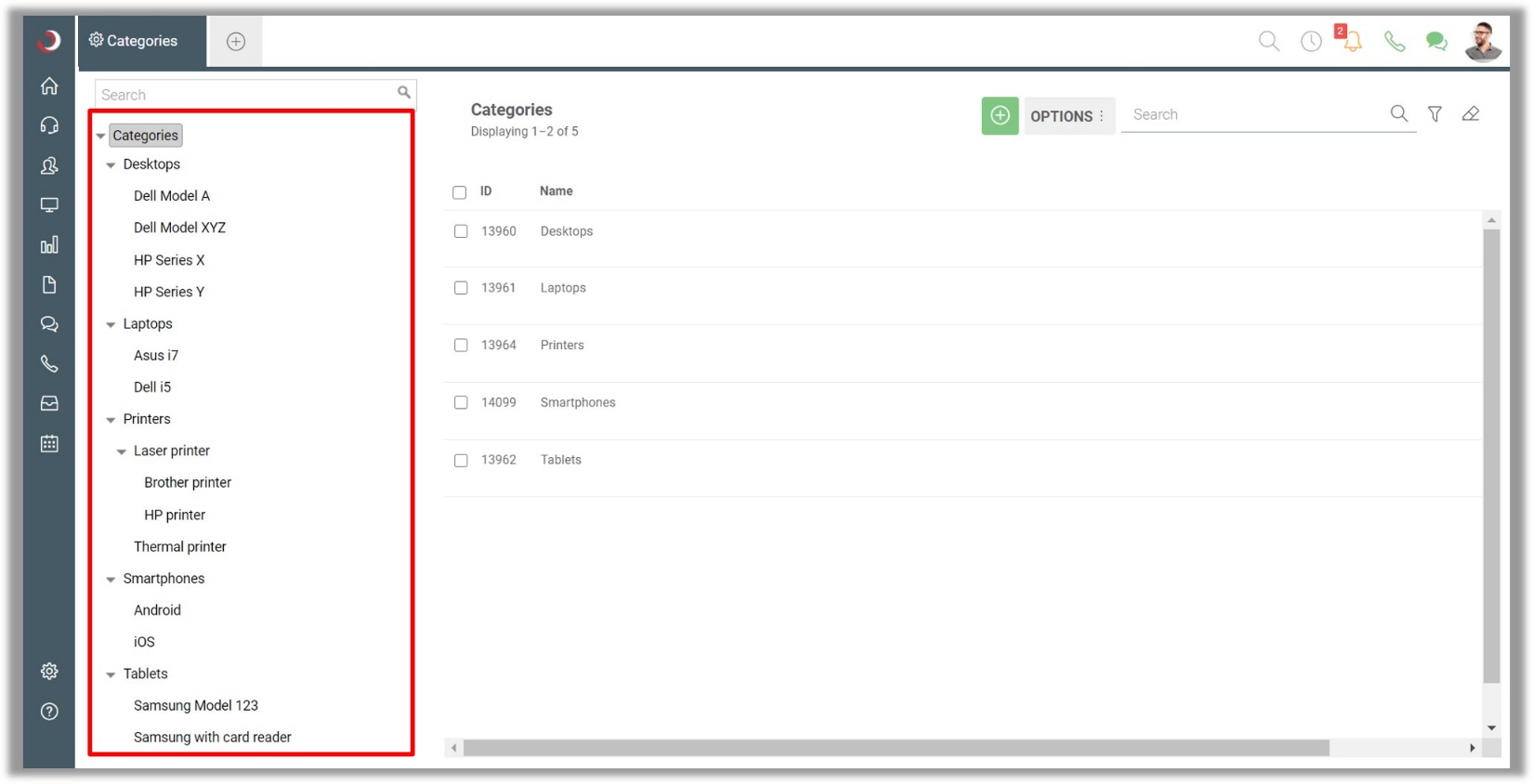
Movidesk’s “tree” structure gives you great flexibility to categorize your assets. Use categories and sub-categories in a multi-level hierarchy to organize your assets according to your needs. For example:
Importing and updating assets
Create and update assets using Movidesk’s standard spreadsheet.
Importing assets with this information automatically creates records in the respective master files:
- Manufacturers
- Brands
- Models
- Locations
- Statuses
- Tags
Create the following items in Movidesk before importing your assets:
- Category – According to the asset catalog structure you create in Movidesk.
- Vendors – Must be created in the People master file before assets are imported.
|
|
Note To provide maximum flexibility, all of the items listed above are optional when creating assets. |

Using triggers and macros
Triggers and macros, along with scheduled tickets, provide great flexibility in automating tasks and communication.
You can create automation conditions and automated actions in triggers and macros based on:
- Assets
- Asset categories
- People (agents, customers, departments, companies, and vendors)
- Tags
- Any other asset detail information, such as location and warranty expiration date.
You can also add, remove, or replace assets on a ticket—all controlled by access profile permissions.
Related Topics: Asset management cost. Fixed assets. Asset financial control. Asset accounting control. Integration of fixed assets. Loading fixed assets. Importing fixed assets. Asset management overview. IT asset management. Asset in triggers. Asset in macros.